
CentOS 6.2 - Installing mod_spdy With Apache 2 - Level Novice
SPDY (Speedy) is an experiment with protocols for the web. Its goal is to reduce the latency of web pages. mod_spdy is an open-source Apache module which supports the use of SPDY protocol to the Apache HTTPD server. This allows for faster page loading and more efficient bandwidth utilization when loading https URLs in SPDY-enabled browsers. https://developers.google.com/speed/spdy/mod_spdy/
Install Apache webserver, mod_ssl and openssl:
yum install httpd mod_ssl openssl
Generate a private key:
openssl genrsa -out ca.key 1024
Generate a CSR:
openssl req -new -key ca.key -out ca.csr
Generate a Self Signed Key:
openssl x509 -req -days 365 -in ca.csr -signkey ca.key -out ca.crt
Copy the files to the correct locations:
cp ca.crt /etc/pki/tls/certs cp ca.key /etc/pki/tls/private/ca.key cp ca.csr /etc/pki/tls/private/ca.csr
Apply SELinux context:
restorecon -RvF /etc/pki
Edit ssl.conf and give the cerificate file path:
vi +/SSLCertificateFile /etc/httpd/conf.d/ssl.conf
SSLCertificateFile /etc/pki/tls/certs/ca.crt SSLCertificateKeyFile /etc/pki/tls/private/ca.key
Quit and save the file and then restart Apache Download the mod_spdy for your platform:
wget https://dl-ssl.google.com/dl/linux/direct/mod-spdy-beta_current_x86_64.rpm
Install mod_spdy:
yum install --nogpgcheck mod-spdy-beta_current_x86_64.rpm
Restart Apache webserver:
/etc/init.d/httpd restart
Open a page from your webserver to mod_spdy enabled browser:
http://192.168.1.222
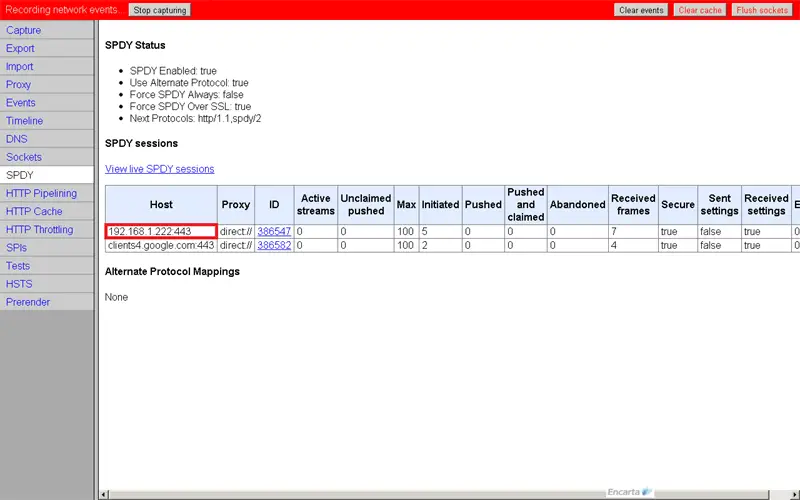
Open the link below into your chrome browser, you will find the listed connection there:
chrome://net-internals/#spdy
You can watch this tutorial on YouTube: http://www.youtube.com/watch?v=ikbRGJonPnk





