
How to Compile A Kernel - The Debian Way
Each distribution has some specific tools to build a custom kernel from the sources. This article is about compiling a kernel on a Debian (Etch) system. It describes how to build a custom kernel using the latest unmodified kernel sources from www.kernel.org (vanilla kernel) so that you are independent from the kernels supplied by your distribution. It also shows how to patch the kernel sources if you need features that are not in there.
I do not issue any guarantee that this will work for you!
1 Preliminary Note
I will describe two ways of compiling a new kernel. Using the first method, you will end up with a kernel .deb package that can be installed on the system, and that you can share with others and install on other Debian Etch systems.
The second method is to compile a kernel the "traditional" way. This way works on any Linux distribution, but of course, you don't end up with a kernel .deb package.
2 Building A Kernel .deb Package
This chapter shows how to build a kernel and end up with a .deb package that you can install and share with others.
2.1 Install Required Packages For Kernel Compilation
First we update our package database:
apt-get update
Then we install all needed packages like this:
apt-get install kernel-package ncurses-dev fakeroot wget bzip2 build-essential
2.2 Download The Kernel Sources
Next we download our desired kernel to /usr/src. Go to www.kernel.org and select the kernel you want to install, e.g. linux-2.6.21.3.tar.bz2 (you can find all 2.6 kernels here: http://www.kernel.org/pub/linux/kernel/v2.6/). Then you can download it to /usr/src like this:
cd /usr/src
wget http://www.kernel.org/pub/linux/kernel/v2.6/linux-2.6.21.3.tar.bz2
Then we unpack the kernel sources and create a symlink linux to the kernel sources directory:
tar xjf linux-2.6.21.3.tar.bz2
ln -s linux-2.6.21.3 linux
cd /usr/src/linux
2.3 Apply Patches To The Kernel Sources (Optional)
Sometimes you need drivers for hardware that isn't supported by the new kernel by default, or you need support for virtualization techniques or some other bleeding-edge technology that hasn't made it to the kernel yet. In all these cases you have to patch the kernel sources (provided there is a patch available...).
Now let's assume you have downloaded the needed patch (I call it patch.bz2 in this example) to /usr/src. This is how you apply it to your kernel sources (you must still be in the /usr/src/linux directory):
bzip2 -dc /usr/src/patch.bz2 | patch -p1 --dry-run
bzip2 -dc /usr/src/patch.bz2 | patch -p1
The first command is just a test, it does nothing to your sources. If it doesn't show errors, you can run the second command which actually applies the patch. Don't do it if the first command shows errors!
You can also apply kernel prepatches to your kernel sources. For example, if you need a feature that is available only in kernel 2.6.22-rc3, but the full sources haven't been released yet for this kernel. Instead, a patch-2.6.22-rc3.bz2 is available. You can apply that patch to the 2.6.21 kernel sources, but not to kernel 2.6.21.1 or 2.6.21.2, etc. This is explained on http://kernel.org/patchtypes/pre.html:
Prepatches are the equivalent to alpha releases for Linux; they live in the testing directories in the archives. They should be applied using the patch(1) utility to the source code of the previous full release with a 3-part version number (for example, the 2.6.12-rc4 prepatch should be applied to the 2.6.11 kernel sources, not, for example, 2.6.11.10.)
So if you want to compile a 2.6.22-rc3 kernel, you must download the 2.6.21 kernel sources (http://www.kernel.org/pub/linux/kernel/v2.6/linux-2.6.21.tar.bz2) in step 3 instead of kernel 2.6.21.3!
This is how you apply the 2.6.22-rc3 patch to kernel 2.6.21:
cd /usr/src
wget http://www.kernel.org/pub/linux/kernel/v2.6/testing/patch-2.6.22-rc3.bz2
cd /usr/src/linux
bzip2 -dc /usr/src/patch-2.6.22-rc3.bz2 | patch -p1 --dry-run
bzip2 -dc /usr/src/patch-2.6.22-rc3.bz2 | patch -p1
2.4 Configure The Kernel
It's a good idea to use the configuration of your current working kernel as a basis for your new kernel. Therefore we copy the existing configuration to /usr/src/linux:
make clean && make mrproper
cp /boot/config-`uname -r` ./.config
Then we run
make menuconfig
which brings up the kernel configuration menu. Go to Load an Alternate Configuration File and choose .config (which contains the configuration of your current working kernel) as the configuration file:
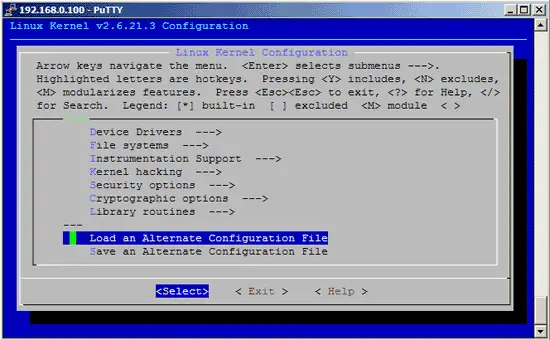
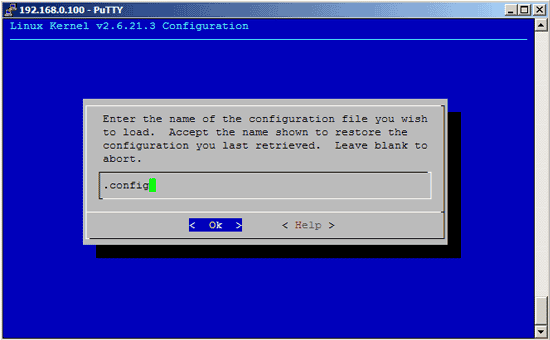
Then browse through the kernel configuration menu and make your choices. When you are finished and select Exit, answer the following question (Do you wish to save your new kernel configuration?) with Yes:
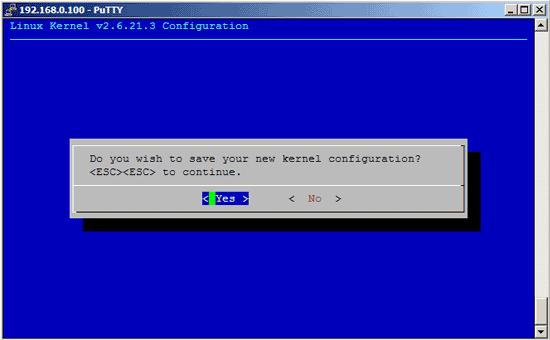
2.5 Build The Kernel
To build the kernel, execute these two commands:
make-kpkg clean
fakeroot make-kpkg --initrd --append-to-version=-custom kernel_image kernel_headers
After --append-to-version= you can write any string that helps you identify the kernel, but it must begin with a minus (-) and must not contain whitespace.
Now be patient, the kernel compilation can take some hours, depending on your kernel configuration and your processor speed.
2.6 Install The New Kernel
After the successful kernel build, you can find two .deb packages in the /usr/src directory.
cd /usr/src
ls -l
On my test system they were called linux-image-2.6.21.3-custom_2.6.21.3-custom-10.00.Custom_i386.deb (which contains the actual kernel) and linux-headers-2.6.21.3-custom_2.6.21.3-custom-10.00.Custom_i386.deb (which contains files needed if you want to compile additional kernel modules later on). I install them like this:
dpkg -i linux-image-2.6.21.3-custom_2.6.21.3-custom-10.00.Custom_i386.deb
dpkg -i linux-headers-2.6.21.3-custom_2.6.21.3-custom-10.00.Custom_i386.deb
(You can now even transfer the two .deb files to other Debian Etch systems and install them there exactly the same way, which means you don't have to compile the kernel there again.)
That's it. The GRUB bootloader configuration file /boot/grub/menu.lst has been modified automatically, and a ramdisk for the new kernel has been create in /boot.
Now reboot the system:
shutdown -r now
At the boot prompt, select your new kernel (should be selected by default):
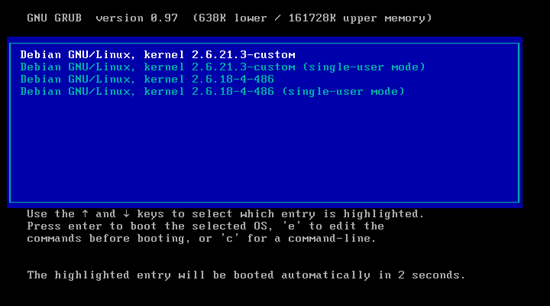
If everything goes well, it should come up with the new kernel. You can check if it's really using your new kernel by running
uname -r
This should display something like
2.6.21.3-custom
If the system doesn't start, restart it, and select your old kernel at the boot prompt. You can now try again to compile a working kernel. Don't forget to remove the stanza(s) of the not-working kernel from /boot/grub/menu.lst.
3 Building A Kernel The Traditional Way
This chapter describes a different approach that can be used on any Linux system (apart from details such as creating a ramdisk or updating the bootloader). Of course you will not end up with a kernel .deb package.
3.1 Install Required Packages For Kernel Compilation
First we update our package database:
apt-get update
Then we install all needed packages like this:
apt-get install kernel-package libncurses5-dev fakeroot wget bzip2 build-essential
3.2 Download The Kernel Sources
Next, we download our desired kernel to /usr/src. Go to www.kernel.org and select the kernel you want to install, e.g. linux-2.6.21.3.tar.bz2 (you can find all 2.6 kernels here: http://www.kernel.org/pub/linux/kernel/v2.6/). Then you can download it to /usr/src like this:
cd /usr/src
wget http://www.kernel.org/pub/linux/kernel/v2.6/linux-2.6.21.3.tar.bz2
Then we unpack the kernel sources and create a symlink linux to the kernel sources directory:
tar xjf linux-2.6.21.3.tar.bz2
ln -s linux-2.6.21.3 linux
cd /usr/src/linux
3.3 Apply Patches To The Kernel Sources (Optional)
Sometimes you need drivers for hardware that isn't supported by the new kernel by default, or you need support for virtualization techniques or some other bleeding-edge technology that hasn't made it to the kernel yet. In all these cases you have to patch the kernel sources (provided there is a patch available...).
Now let's assume you have downloaded the needed patch (I call it patch.bz2 in this example) to /usr/src. This is how you apply it to your kernel sources (you must still be in the /usr/src/linux directory):
bzip2 -dc /usr/src/patch.bz2 | patch -p1 --dry-run
bzip2 -dc /usr/src/patch.bz2 | patch -p1
The first command is just a test, it does nothing to your sources. If it doesn't show errors, you can run the second command which actually applies the patch. Don't do it if the first command shows errors!
You can also apply kernel prepatches to your kernel sources. For example, if you need a feature that is available only in kernel 2.6.22-rc3, but the full sources haven't been released yet for this kernel. Instead, a patch-2.6.22-rc3.bz2 is available. You can apply that patch to the 2.6.21 kernel sources, but not to kernel 2.6.21.1 or 2.6.21.2, etc. This is explained on http://kernel.org/patchtypes/pre.html:
Prepatches are the equivalent to alpha releases for Linux; they live in the testing directories in the archives. They should be applied using the patch(1) utility to the source code of the previous full release with a 3-part version number (for example, the 2.6.12-rc4 prepatch should be applied to the 2.6.11 kernel sources, not, for example, 2.6.11.10.)
So if you want to compile a 2.6.22-rc3 kernel, you must download the 2.6.21 kernel sources (http://www.kernel.org/pub/linux/kernel/v2.6/linux-2.6.21.tar.bz2) in step 3 instead of kernel 2.6.21.3!
This is how you apply the 2.6.22-rc3 patch to kernel 2.6.21:
cd /usr/src
wget http://www.kernel.org/pub/linux/kernel/v2.6/testing/patch-2.6.22-rc3.bz2
cd /usr/src/linux
bzip2 -dc /usr/src/patch-2.6.22-rc3.bz2 | patch -p1 --dry-run
bzip2 -dc /usr/src/patch-2.6.22-rc3.bz2 | patch -p1
3.4 Configure The Kernel
It's a good idea to use the configuration of your current working kernel as a basis for your new kernel. Therefore we copy the existing configuration to /usr/src/linux:
make clean && make mrproper
cp /boot/config-`uname -r` ./.config
Then we run
make menuconfig
which brings up the kernel configuration menu. Go to Load an Alternate Configuration File and choose .config (which contains the configuration of your current working kernel) as the configuration file:
Then browse through the kernel configuration menu and make your choices. When you are finished and select Exit, answer the following question (Do you wish to save your new kernel configuration?) with Yes:
3.5 Build And Install The Kernel
To build the kernel, execute these commands:
make all
make modules_install
make install
Now be patient, the kernel compilation can take some hours, depending on your kernel configuration and your processor speed.
3.6 Post-Installation Steps
The new kernel is now installed, but we still need a ramdisk for our new kernel (otherwise the system will most likely not boot!), and we need to tell the GRUB bootloader about our new kernel.
First, we do this:
depmod 2.6.21.3
apt-get install yaird
Then we create a ramdisk with the following command:
mkinitrd.yaird -o /boot/initrd.img-2.6.21.3 2.6.21.3
The GRUB configuration is very easy on Debian Etch. All we have to do is run
update-grub
This will detect the new kernel and ramdisk and update /boot/grub/menu.lst for us.
Now reboot the system:
shutdown -r now
At the boot prompt, select your new kernel (should be selected by default). If everything goes well, it should come up with the new kernel. You can check if it's really using your new kernel by running
uname -r
This should display something like
2.6.21.3
If the system doesn't start, restart it, and select your old kernel at the boot prompt. You can now try again to compile a working kernel. Don't forget to remove the stanza(s) of the not-working kernel from /boot/grub/menu.lst.
4 Links
- Debian: http://www.debian.org
- The Linux Kernel Archives: http://www.kernel.org





