
How To Specify A Custom php.ini For A Web Site (Apache2 With mod_php)

Do you like HowtoForge? Please consider supporting us by becoming a subscriber.
Submitted by falko (Contact Author) (Forums) on Tue, 2009-02-03 11:59. :: Apache | PHP

How To Specify A Custom php.ini For A Web Site (Apache2 With mod_php)

Version 1.0
Author: Falko Timme <ft [at] falkotimme [dot] com>
Last edited 02/02/2009

This short article explains how you can specify a custom php.ini for a web site running on Apache2 with mod_php. That way, each web site can have its own php.ini instead of having to use the server's default one.

I do not issue any guarantee that this will work for you!


1 Preliminary Note

I'm using the web site www.example.com here with the document root /var/www/web1/web here.

If you want to learn how to configure a custom php.ini for a web site using Apache + mod_fcgid + PHP, take a look at chapter 5 on http://www.howtoforge.com/how-to-set-up-apache2-with-mod_fcgid-and-php5-on-debian-etch-p2.


2 Getting Details About Your PHP Installation

We will now create a small PHP file (info.php) in the document root and call it in a browser. The file will display lots of useful details about our PHP installation, such as the used php.ini file.

vi /var/www/web1/web/info.php

<?php
phpinfo();
?>

Now we call that file in a browser (e.g. http://www.example.com/info.php):
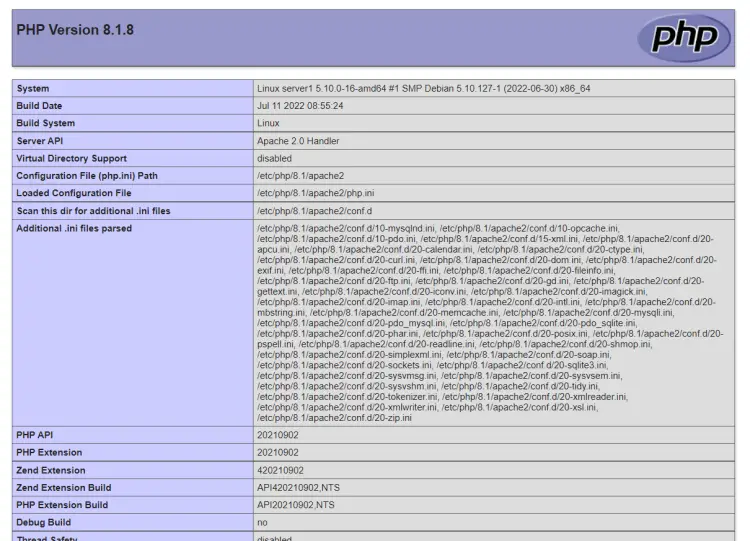
As you see, the web site is currently using the /etc/php5/apache2/php.ini file.


3 Custom php.ini For Each Web Site

I will copy the default php.ini (/etc/php5/apache2/php.ini on Debian/Ubuntu; /etc/php.ini on Fedora/CentOS) to the /var/www/web1/ directory and make www.example.com use the php.ini from the /var/www/web1/ directory:

Debian/Ubuntu:

cp /etc/php5/apache2/php.ini /var/www/web1/

Fedora/CentOS:

cp /etc/php.ini /var/www/web1/

(You can now modify /var/www/web1/php.ini to your likings.)

Then open the vhost configuration for the www.example.com web site and add a PHPINIDir line to it:

<VirtualHost 1.2.3.4:80>
[...]
PHPINIDir /var/www/web1
[...]
</VirtualHost>

PHPINIDir must contain the directory where the php.ini file for the web site is located.

Restart Apache afterwards:

Debian/Ubuntu:

/etc/init.d/apache2 restart

Fedora/CentOS:

/etc/init.d/httpd restart

Now call the info.php file again in a browser (http://www.example.com/info.php):
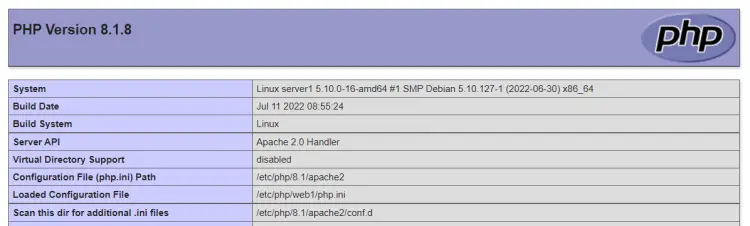
The Configuration File (php.ini) Path line should now show the new php.ini.


4 Links


Please do not use the comment function to ask for help! If you need help, please use our forum.
Comments will be published after administrator approval.
Submitted by ahsiangsiang (not registered) on Tue, 2009-02-03 18:18.

i use .htaccess to change certain php_value....

any comment about my method?

Submitted by mhmd_1983 (not registered) on Thu, 2009-07-09 09:20.
you can't change all values from htaccess , but it a simple way to change simple things , and i think using the php.ini itself decrease the load on apache
Submitted by majo (not registered) on Thu, 2009-09-24 14:21.
Hi,
This information is wrong. With Apache 2.2.10 + you can 't have INI for each virtual site. If specifiy in more than conf file you will get error that you can define PHPINIDIR only once and subsequent definitions will be ignored.

majo

Submitted by Anonymous (not registered) on Mon, 2009-10-12 20:34.

My experience matches majo's. With my apache 2.2x, I could not set separate php.ini files for each site, even using httpd.conf.

However, it may be possible to set specific php variables on a per-site basis if you have access to httpd.conf.

I was able to set some php_value variables in .htaccess, but php_admin_value variables, such as "sendmail_path" must be set in httpd.conf. My only goal was to use separate msmtp accounts to send through Google Apps from different sites. 

 I did this by putting the following inside the root directory <Directory> tags for each site: 

 php_admin_value sendmail_path "/usr/bin/msmtp -C /path/to/msmtprc -t"

 For example: 

<Directory "/var/www/site1">

  php_admin_value sendmail_path "/usr/bin/msmtp -C /path/to/site1msmtprc -t"

</Directory> 

 <Directory "/var/www/site2">

 php_admin_value sendmail_path "/usr/bin/msmtp -C /path/to/site2msmtprc -t"

 </Directory>

In my case, I have separate conf files for each site, and I placed these strings inside each conf file between the <VirtualHost> tags. I am not sure if these commands would work outside of a virtual hosting situation, but it may be worth a try.  

 I know this is a bit off-topic, but I found this site looking for the information that I have written here; hopefully this may help someone else. 

Sponsored Links: Turn your desk phone and mobile phone into one with Sprint Mobile Integration.
www.seamlessenterprise.com

One number. One voicemail. Seize the lead. Sprint Mobile Integration.
www.seamlessenterprise.com

One Number. One Voicemail.
Make it easier for clients to reach you. Turn your desk phone and mobile phone into one with Sprint Mobile Integration.
www.seamlessenterprise.com

One number. One voicemail. Sprint Mobile Integration.
www.seamlessenterprise.com

One number. one voicemail. Seize the lead with Sprint. Learn more

AT&T Synaptic Compute as a Service. Boost your power on demand.

Trial: IBM Cognos Express Reporting, Analysis & Planning

Learn benefits of Simpana software.
View the Gartner Video

Sprint 4G - The Ultimate Mobile Broadband
Click here

SAP-Business Objects Crystal Reports Server
Complete reporting without hidden costs. Free Trial
