Resolving DNS Domain Names using dig Command on Linux
The dig command in Linux, short for "Domain Information Groper," is a network administration tool used for querying DNS (Domain Name System) servers. It allows users to retrieve information about domain names, such as IP addresses, mail servers (MX records), and other DNS resource records. Primarily used for troubleshooting DNS issues, dig provides detailed output, including the response time of queries and the DNS server that provided the information. Its flexibility and precision make it a preferred tool among network administrators for diagnosing DNS problems, testing domain configurations, and performing DNS lookups compared to more basic commands like nslookup.
Use the dig command to resolve a domain name
Resolving the domain example.com:
dig example.com
If the domain can be resolved, the result will be similar to this:
root@server1:~# dig howtoforge.com

; <<>> DiG 9.11.3-1ubuntu1.1-Ubuntu <<>> howtoforge.com
;; global options: +cmd
;; Got answer:
;; ->>HEADER<<- opcode: QUERY, status: NOERROR, id: 50297
;; flags: qr rd ra; QUERY: 1, ANSWER: 2, AUTHORITY: 0, ADDITIONAL: 1

;; OPT PSEUDOSECTION:
; EDNS: version: 0, flags:; udp: 512
;; QUESTION SECTION:
;howtoforge.com. IN A

;; ANSWER SECTION:
howtoforge.com. 299 IN A 104.24.0.68
howtoforge.com. 299 IN A 104.24.1.68

;; Query time: 233 msec
;; SERVER: 8.8.8.8#53(8.8.8.8)
;; WHEN: Wed Aug 08 12:35:15 CEST 2024
;; MSG SIZE rcvd: 75
How to query the local DNS server with dig
To check if the local webserver is responsible for this domain use the following command:
dig @localhost example.com
Get mail server name with dig
If you want to know which mailserver is responsible for handling the mail for example.com, you can use the command:
dig MX example.com
The result will be similar to this:
root@server1:~# dig MX howtoforge.com

; <<>> DiG 9.11.3-1ubuntu1.1-Ubuntu <<>> MX howtoforge.com
;; global options: +cmd
;; Got answer:
;; ->>HEADER<<- opcode: QUERY, status: NOERROR, id: 14115
;; flags: qr rd ra; QUERY: 1, ANSWER: 1, AUTHORITY: 0, ADDITIONAL: 1

;; OPT PSEUDOSECTION:
; EDNS: version: 0, flags:; udp: 512
;; QUESTION SECTION:
;howtoforge.com. IN MX

;; ANSWER SECTION:
howtoforge.com. 299 IN MX 10 mail.howtoforge.com.

;; Query time: 205 msec
;; SERVER: 8.8.4.4#53(8.8.4.4)
;; WHEN: Wed Aug 08 10:36:30 CEST 2024
;; MSG SIZE rcvd: 64
Get more options of dig command
To get all available options for the dig command, you can run:
dig --help
A more detailed description you will find in the manpage of the dig command:
man dig
Here's an excerpt from the tool's man page that makes it amply clear how to use dig:
A typical invocation of dig looks like:

dig @server name type

where:

  server
     is the name or IP address of the name server to query. This can be an IPv4 address in
     dotted-decimal notation or an IPv6 address in colon-delimited notation. When the supplied
     server argument is a hostname, dig resolves that name before querying that name server.

     If no server argument is provided, dig consults /etc/resolv.conf; if an address is found
     there, it queries the name server at that address. If either of the -4 or -6 options are in
     use, then only addresses for the corresponding transport will be tried. If no usable addresses
     are found, dig will send the query to the local host. The reply from the name server that
     responds is displayed.

  name
     is the name of the resource record that is to be looked up.

  type
     indicates what type of query is required — ANY, A, MX, SIG, etc.  type can be any valid query
     type. If no type argument is supplied, dig will perform a lookup for an A record.
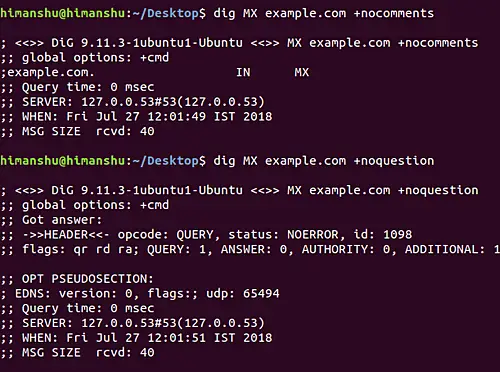
You can force the dig command to remove certain sections from the output display if you want. For example, to toggle the display of comment lines in the output or the question section of a query when an answer is returned, use the +nocomments and +noquestion options.
The following screenshot shows these options in action:
Get the name servers of a domain
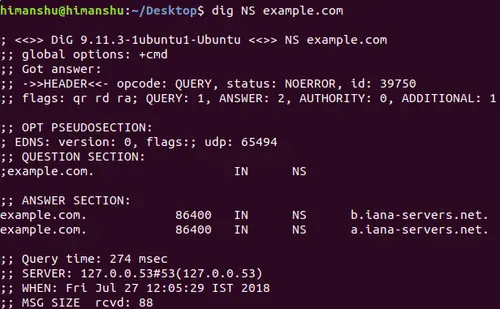
Moving on, you can query NS records like MX records through the dig command. Here's how you can do it:
dig NS example.com
Following is the output this command produced in our case:
Get the IP address of a domain name with dig command
If you want dig only to display the server's IP address, use the +short option.
For example:
dig example.com +short

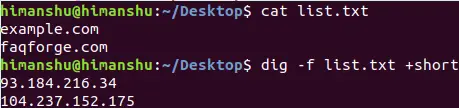
If you want to query multiple websites/servers in one go, you can create a list of names in a file, and pass the name of that file as input to the -f option of the dig command.
-f file

Batch mode: dig reads a list of lookup requests to process from the given file. Each line in the
file should be organized in the same way they would be presented as queries to dig using the
command-line interface.
Here's an example: